In Canada alone, online retail sales continue to grow every year as more businesses move online.
This rapid shift has made e-commerce website development a critical investment rather than an optional one.
Yet one question stops many business owners right away; what will be the actual cost to develop an e-commerce website?
The answer depends on several factors, from platform choice to features and long-term goals.
This guide breaks everything down in simple terms so you can budget wisely and avoid surprises.
What Is E-Commerce Website Development?
E-commerce website development is the process of building an online store that allows customers to browse products, add items to a cart, make payments, and track orders.
It includes design, coding, integrations, security, and performance optimization.
A well-built e-commerce site does more than sell products. It builds trust, supports marketing efforts, and grows with your business.
Because every business has different needs, e-commerce website development costs can vary widely.
Average Cost of E-Commerce Website Development
In Canada, the cost of e-commerce website development usually falls into three main ranges.
These ranges depend on complexity, customization, and long-term goals.
A basic e-commerce website often costs between CAD 3,000 and CAD 7,000.
This suits small businesses with a limited product catalog and standard features.
A mid-range e-commerce website typically costs between CAD 8,000 and CAD 20,000.
These sites include custom design, better performance, and added integrations.
A large or enterprise-level e-commerce website can cost CAD 25,000 to CAD 60,000 or more.
These projects involve custom development, advanced security, and complex workflows.
It is important to remember that these are development costs only. Ongoing expenses come later.
Key Factors That Affect E-Commerce Website Development Cost
a. Platform Choice
The platform you choose has a big impact on cost.
Hosted platforms like Shopify are easier to set up and usually cost less upfront.
Whereas, Open-source platforms like WooCommerce give more flexibility but may cost more in development and maintenance.
Fully custom platforms are the most expensive but offer complete control.
b. Design Requirements
Using a ready-made theme is cheaper than building a custom design.
Custom design improves branding and user experience but adds to development time and cost.
Mobile responsiveness is no longer optional and must be included.
c. Features and Functionality
Basic features include product pages, cart, checkout, and payment processing.
Advanced features like subscriptions, product filters, custom shipping rules, and loyalty programs increase cost.
The more complex the logic, the higher the development effort.
d. Number of Products
A store with 20 products costs less than one with 2,000 products.
Large catalogs need better performance optimization, structured data, and search functionality.
e. Integrations
Many businesses need integrations with inventory systems, CRMs, accounting software, or marketing tools.
Each integration adds time and cost to e-commerce website development.
f. Development Team
Freelancers often charge less than agencies, but agencies usually provide better project management, testing, and long-term support.
Canadian agencies typically charge higher rates than offshore teams but offer local expertise and compliance support.
Cost Breakdown by E-Commerce Website Type
Website Type
Typical Cost Range CAD
Best For
Basic Store
3,000 to 7,000
Startups and small shops
Mid-Size Store
8,000 to 20,000
Growing businesses
Enterprise Store
25,000 to 60,000+
Large brands and B2B
Custom Platform
40,000+
Unique business models
Note: These prices are just an average estimate and can vary as per project needs and budget
Ongoing Costs After Development
Building the website is only the first step. Running an e-commerce business involves ongoing expenses.
Hosting can cost between CAD 20 and CAD 300 per month, depending on traffic and performance needs.
Plugins and extensions may add another CAD 30 to CAD 200 per month.
Maintenance and updates are often overlooked.
Businesses typically spend CAD 1,000 to CAD 5,000 per year on updates, security, and bug fixes.
Marketing, SEO, and paid ads are separate costs but closely tied to how well your e-commerce website performs.
Hidden Costs You Should Know About
Many businesses underestimate hidden costs in e-commerce website development.
Payment gateways charge transaction fees that range from 2 to 3 percent per sale. Premium plugins often renew annually.
Scaling also costs money.
As traffic grows, you may need better hosting, caching, or a content delivery network.
Security upgrades and compliance tools can add extra expenses.
Planning for these early helps avoid budget stress later.
Custom vs Template-Based E-Commerce Websites
Template-based websites cost less and launch faster. They work well for simple stores with standard needs.
However, customization is limited.
Custom e-commerce website development costs more but offers flexibility, better performance, and unique branding.
It also supports complex business rules and future growth.
If your business relies heavily on online sales or has unique workflows, custom development often provides better long-term value.
How to Reduce E-Commerce Website Development Costs?
– Start with a clear project scope and focus only on essential features in the beginning
– Build a minimum viable product first and add advanced features later as your business grows
– Choose an e-commerce platform that fits your current business size and budget
– Avoid overbuilding or adding complex features that are not immediately needed
– Reuse reliable tools and plugins instead of custom-building everything from scratch
How Much Should You Budget for Your Business?
If you are a small business just starting, budgeting CAD 4,000 to CAD 6,000 is realistic.
Growing businesses should plan for CAD 10,000 to CAD 15,000 to support scaling.
Enterprises or B2B companies often need budgets above CAD 30,000 to handle security, integrations, and performance needs.
Your budget should reflect your revenue goals, not just current size.
Conclusion
E-commerce website development is an investment that shapes how customers experience your brand online.
The cost depends on your goals, platform, features, and growth plans.
By understanding where the money goes, you can make smarter decisions and avoid hidden expenses.
For businesses planning their next steps, teams like Adsagenz often recommend starting with clear goals, realistic budgets, and scalable planning so the website supports long-term growth without unnecessary complexity.
FAQs
a. How long does e-commerce website development usually take?
Most basic e-commerce websites take four to six weeks to complete. Mid-size projects usually take two to three months. Large or custom platforms can take four to six months, depending on complexity and testing requirements.
b. Is e-commerce website development a one-time cost?
No, it is not a one-time cost. While development is a major upfront expense, businesses must also pay for hosting, maintenance, updates, and platform fees over time. These ongoing costs are essential for security and performance.
c. Can I lower costs by building the website myself?
DIY platforms can reduce initial costs, but they often limit customization and scalability. Many businesses later spend more time fixing performance issues or redesigning the site. Professional e-commerce website development usually delivers better long-term results
d. Why do e-commerce website development prices vary so much?
Prices vary because every project is different. Platform choice, features, integrations, design complexity, and developer experience all affect the final cost. There is no single fixed price for all businesses.
Last day, I opened a jewellery website to shop for some of the latest jewellery collections for my friend.
I have heard that the collection on this website is very unique, and the prices are also reasonable within budget.
But you know, as soon as I typed in the website on search bar, to my surprise, the website took so long to load, I guess almost 30 secs
I thought that I might be having some internet issue on my wifi but when I switched to mobile data, the same issue continued, and this time it took almost a minute.
You know my complete experience of visiting the website was almost ruined by the slow loading speed of the website.
We don’t think much about this, but honestly speaking, website performance matters a lot.
These numbers highlight a true reality that many businesses still underestimate.
Website Performance is no longer optional or something that can be delayed.
It directly affects search visibility, user trust, and revenue potential.
Search engines and users now expect fast, stable, and responsive websites.
When website performance suffers, rankings slip, and conversions drop.
Now, let’s understand the impacts and solutions of website performance closely.
What Website Performance Really Means?
Users expect speed. Not “reasonably fast.”
If your site takes more time to load, visitors start losing trust before they even see your content.
Google and other search engines evaluate performance using a combination of technical and user-focused metrics.
The most important among them are Core Web Vitals, which measure loading speed, interactivity, and visual stability.
These metrics reflect how real users experience a website rather than how it performs in a controlled environment.
Performance also varies across devices, browsers, and network conditions.
A site that feels fast on a desktop with high-speed internet may feel slow on a mobile device using a slower connection.
That difference plays a significant role in both SEO rankings and conversion outcomes.
How Website Performance Impacts SEO?
SEO is all about how well your website appears on search engines, and to appear on search engines perfectly, your website’s performance needs to be excellent.
Google’s primary goal is to deliver the best possible results to users, and performance is a key indicator of whether a website can meet that expectation.
When a site loads quickly, responds smoothly, and remains stable, it creates a positive experience that search engines are more likely to reward with higher visibility.
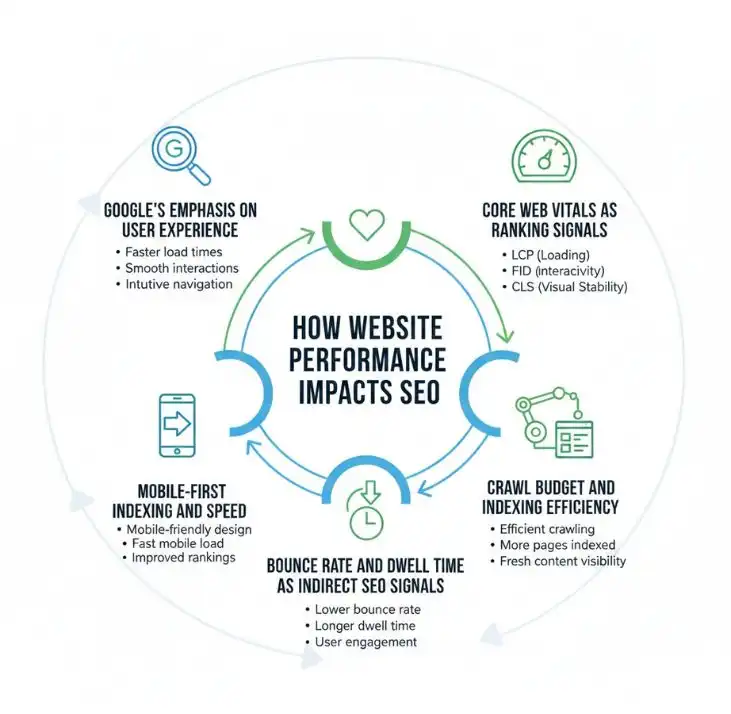
a. Google’s Emphasis on User Experience
Google has slowly shifted its ranking algorithms toward user experience.
Beyond relevant content, search engines now check how easily users can access and interact with that content.
Slow-loading pages can frustrate users and prevent them from finding information efficiently.
As a result, websites with strong performance are more likely to align with Google’s goal of delivering helpful and satisfying search results.
b. Core Web Vitals as Ranking Signals
Core Web Vitals are Google’s primary performance metrics and are officially confirmed ranking signals.
These metrics measure loading speed, interactivity, and visual stability based on real user data.
Websites that meet recommended guidelines are more likely to benefit from improved rankings, particularly in competitive search results.
While strong Core Web Vitals alone do not guarantee top positions, poor scores can hold a site back even when content quality is high.
Improving these metrics helps ensure that technical limitations do not undermine SEO efforts.
c. Crawl Budget and Indexing Efficiency
Each website is allocated a limited crawl budget by search engines.
This determines how many pages a search engine bot can crawl within a given time.
When a website’s performance is poor, crawlers spend more time loading pages, which reduces the number of URLs they can access.
Faster websites allow search engines to crawl and index content more efficiently.
d. Mobile-First Indexing and Speed
Google uses mobile-first indexing, meaning it primarily evaluates the mobile version of a website when determining rankings.
Mobile performance is therefore essential for SEO success.
Pages that load slowly or are poor on mobile devices risk losing visibility, even if the desktop experience is strong.
Mobile users often access websites on slower networks, making speed optimization even more critical.
A well-optimized mobile experience signals quality and reliability to search engines and users alike.
e. Bounce Rate and Dwell Time as Indirect SEO Signals
Although bounce rate and dwell time are not direct ranking factors, they reflect how users interact with search results.
Poor website performance often leads to higher bounce rates because users leave before engaging with the content.
Short dwell times suggest that visitors did not find the experience useful or accessible.
When users stay longer, scroll, and interact with a page, it signals satisfaction.
Strong website performance supports positive engagement patterns, which indirectly reinforce a site’s SEO strength over time.
How Website Performance Affects Conversions?
Website performance has a direct and measurable influence on conversion rates.
Every second of delay increases the chances that users will complete a desired action.
Modern users expect fast, responsive experiences, and when those expectations are not met, conversions decline regardless of how strong the offer or messaging may be.
a. Statistics on Speed vs. Conversion Rates
Multiple studies confirm the relationship between speed and conversions.
Research from Google shows that as page load time increases from one to three seconds, the probability of a bounce rises by more than 30 percent.
Portent’s analysis found that websites loading in one second convert significantly better than those loading in five seconds.
Even small improvements in website performance can lead to noticeable gains in conversion rates, making speed optimization one of the highest-impact improvements businesses can make.
b. Impact on Lead Generation Forms
Lead generation forms are highly sensitive to performance issues.
Slow-loading pages reduce trust and increase abandonment before users even reach the form.
Delays during form submission or validation often cause users to abandon the process entirely.
Strong website performance ensures that forms load quickly, respond instantly, and feel reliable, which increases completion rates and improves lead quality.
c. Impact on E-commerce Checkout Processes
E-commerce conversions depend heavily on smooth and fast checkout experiences.
Performance delays during cart loading, payment processing, or order confirmation create anxiety and frustration.
Even brief pauses can lead users to question transaction security or abandon their purchase.
d. Impact on CTA Clicks and Engagement
Calls to action rely on momentum and timing.
When a page feels slow or unresponsive, users hesitate to click buttons or engage with interactive elements.
Delayed animations or lagging responses break the flow of interaction.
Strong website performance ensures that CTAs feel immediate and responsive, which increases engagement and encourages users to take the next step.
e. Mobile Performance and Conversion Drop
Mobile users are particularly sensitive to performance issues due to smaller screens and varying network speeds.
Slow mobile experiences lead to higher abandonment rates and lower conversion potential.
Google reports that mobile users are more likely to leave a site if it takes longer than a few seconds to load.
Optimizing website performance for mobile devices helps reduce drop-offs and supports consistent conversion rates across devices.
In every stage of the user journey, website performance influences decision-making.
Faster, more responsive websites remove barriers, build trust, and create the conditions necessary for higher conversion rates.
Common Website Performance Issues
Below is the list of common website performance issues that cause serious harm to seo and conversions
a. Unoptimized Images and Media
Images and media files are among the largest assets on most websites.
When they are uploaded without compressing, proper sizing, or modern formats, they start to slow down page load times.
High-resolution images displayed at smaller sizes waste bandwidth and increase loading delays.
Poorly optimized videos can also block rendering and affect overall responsiveness.
Optimizing images ensures faster delivery without compromising visual quality.
b. Excessive JavaScript and CSS
Heavy use of JavaScript and CSS can block page rendering and delay interactivity.
Large scripts, unused code, and multiple external files force browsers to process more resources before displaying content.
This results in slower load times and delayed user interactions.
Reducing file sizes, removing unused code, and prioritizing critical resources improve website performance and responsiveness.
c. Poor Hosting or Server Response Times
Server performance plays a major role in how quickly a website loads.
Slow hosting environments increase Time to First Byte, which delays every subsequent step in the loading process.
Shared hosting, outdated infrastructure, or misconfigured servers often struggle to handle traffic efficiently.
Reliable hosting and proper server optimization are foundational to strong website performance.
d. Lack of Caching or CDN Usage
Without caching, browsers and servers must repeatedly load the same resources for returning visitors.
This increases load times and unnecessary server strain.
Similarly, the absence of a content delivery network forces users to fetch assets from a single server location, which increases latency for users farther away.
Caching and CDN usage improve load speed, reduce server load, and create a more consistent experience across regions.
d. Third-Party Scripts and Plugins
Third-party scripts such as analytics tools, tracking pixels, chat widgets, and plugins often add hidden performance costs.
Each additional script increases the number of requests and processing time required to load a page.
Poorly optimized plugins can significantly slow down websites and introduce stability issues.
Regularly auditing and minimizing third-party scripts helps maintain strong website performance without sacrificing functionality.
Best Practices to Improve Website Performance
Focusing on proven best practices helps create faster, more reliable experiences that support both SEO and conversions.
a. Image Optimization and Modern Formats
Images often makes for the largest portion of page weight.
Optimizing them reduces load times without sacrificing visual quality.
This includes resizing images to the exact dimensions needed, compressing files, and using modern formats such as WebP or AVIF where supported.
Proper image optimization ensures faster rendering and improves overall website performance, especially on mobile devices and slower networks.
b. Minification and Compression
Minification removes unnecessary characters from CSS, JavaScript, and HTML files, reducing file size without affecting functionality.
Compression techniques like Gzip or Brotli further shrink file sizes before they are sent to the browser.
Together, minification and compression reduce bandwidth usage and speed up content delivery, making pages load more quickly for users.
c. Lazy Loading Strategies
Lazy loading delays the loading of images, videos, and other non-essential resources until they are needed.
Instead of loading everything at once, content appears as users scroll. This approach improves initial page load time and enhances perceived performance.
Lazy loading is especially effective for content-heavy pages and long-form websites.
d. Using CDNs and Performance-Focused Hosting
A content delivery network distributes website assets across multiple geographic locations, allowing users to load content from the server closest to them.
This reduces latency and improves load times for global audiences.
Performance-focused hosting providers also offer optimized server configurations, faster response times, and better scalability.
Together, these solutions form a strong foundation for consistent website performance.
e. Reducing Third-Party Scripts
Third-party scripts often introduce performance delays that are difficult to detect.
Each script adds network requests and processing overhead.
Auditing and removing unnecessary scripts helps reduce load times and improve stability.
For essential tools, choosing lightweight alternatives or deferring their loading can significantly improve website performance without compromising functionality.
By applying these best practices, businesses can build websites that load faster, feel smoother, and perform reliably across devices and network conditions.
Tools to Measure Website Performance
The following tools are widely used because they combine real user data, technical audits, and actionable insights.
a. Google PageSpeed Insights
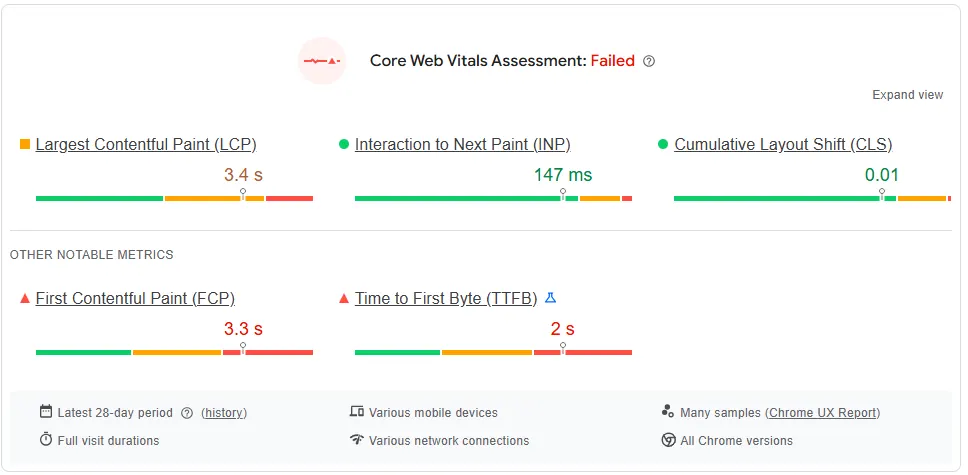
Google PageSpeed Insights analyzes website performance using both lab data and real user data from the Chrome User Experience Report.
It highlights Core Web Vitals, loading speed, and optimization opportunities.
The tool is especially useful for understanding how Google evaluates website performance and where improvements can have the greatest SEO impact.
b. Lighthouse
Lighthouse is an open-source auditing tool built into Chrome DevTools.
It evaluates website performance, accessibility, SEO, and best practices in a controlled environment.
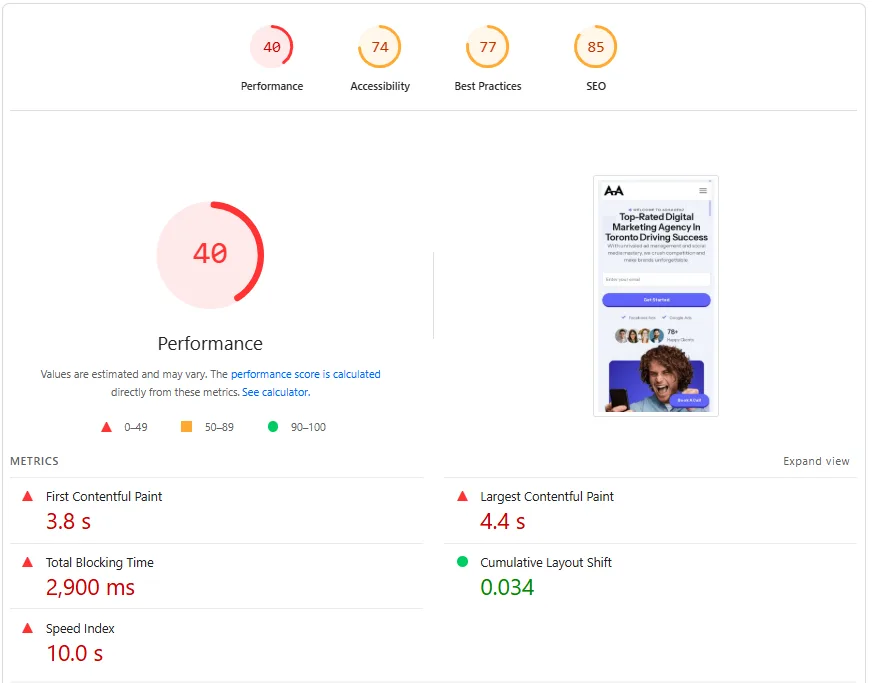
Lighthouse is valuable for diagnosing technical issues such as render-blocking resources, unused JavaScript, and inefficient image delivery that affect website performance.
c. GTmetrix
GTmetrix provides detailed performance reports that include page load time, total page size, and request counts.
It allows testing from different locations and devices, helping identify regional or mobile-specific performance issues.
GTmetrix also offers visual timelines that show how a page loads, making it easier to pinpoint bottlenecks.
d. WebPageTest
WebPageTest offers advanced testing options, including multiple browser types, network speeds, and geographic locations.
It provides granular insights into Time to First Byte, rendering milestones, and content loading sequences.
This tool is particularly useful for diagnosing complex website performance issues and testing optimization changes.
e. Google Search Console Core Web Vitals Report
Google Search Console aggregates real user performance data across your entire website.
The Core Web Vitals report groups URLs by performance status and highlights pages that need improvement.
This tool is essential for monitoring website performance trends over time and understanding how performance impacts search visibility at scale.
Regularly using these tools helps ensure that website performance remains aligned with SEO goals and user expectations.
Conclusion
Website Performance sits at the intersection of SEO, user experience, and conversions.
It influences how search engines rank pages and how users interact with them in real time.
A fast, stable, and responsive website builds trust, improves visibility, and supports sustainable growth.
Businesses that treat performance as an ongoing priority are better positioned to adapt to evolving search algorithms and user expectations.
If you are evaluating how performance fits into your broader digital strategy, teams like Adsagenz often emphasize performance-first thinking as part of long-term optimization efforts.
Taking the time to assess and improve Website Performance today can create meaningful results across search visibility and conversion outcomes tomorrow.
FAQs
1. How does website performance affect SEO?
Website performance affects user behavior and Core Web Vitals, both of which influence search rankings and visibility.
2. What is website speed optimization?
Website speed optimization involves improving load times and responsiveness through better asset management, code efficiency, and caching.
3. Which website performance metrics matter most?
Page load time, LCP, INP, and CLS are the most impactful metrics for SEO and user experience.
4. Does a faster website speed increase conversions?
Yes. Faster sites reduce friction, increase trust, and lead to higher conversion rates.
5. How often should website performance be checked?
At least quarterly, or after major updates. Ongoing monitoring helps prevent performance regressions.
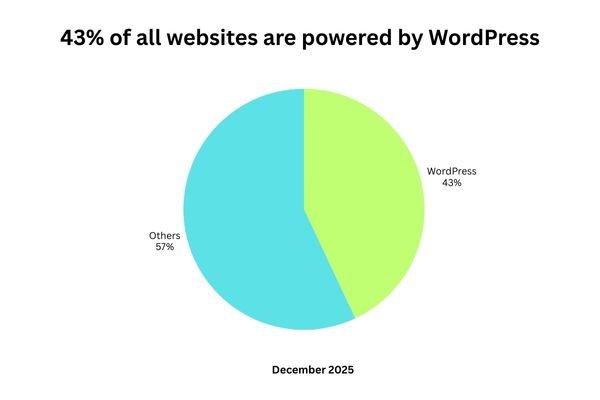
According to data, more than 43% of all websites on the internet are powered by WordPress in 2025. That surpasses the combined market share of Joomla, Wix, Squarespace, and Shopify.
Surprisingly, more than 62% of content management systems globally are powered by WordPress.
Just these figures raise important questions for many individuals as we proceed.
Is WordPress a good choice in 2026, or is it eventually losing momentum to more modern, eye-catching platforms?
With AI tools reshaping content creation, no-code builders growing rapidly, and performance expectations higher than ever, choosing the right website platform is no longer a casual decision.
Businesses, creators, and developers need clarity. This article takes a grounded, future-focused look at WordPress in 2026 to help you decide whether it still deserves its crown.
But let’s first answer the main question!
Is WordPress a Good Choice in 2026?
Yes, WordPress is still a good choice in 2026, but it is not a one-size-fits-all solution.
WordPress today is very different from what many people used years ago.
It has evolved into a flexible, AI-compatible, and enterprise-ready platform that supports modern technologies like artificial intelligence, headless setups, and advanced performance optimization.
This ability to adapt is the main reason WordPress continues to stay relevant while many platforms become restrictive or outdated.
At the same time, WordPress comes with real challenges that cannot be ignored.
It requires regular maintenance, careful plugin management, and a basic level of technical understanding to run smoothly and securely.
For users who want a completely hands-off experience, this can feel demanding.
Ultimately, whether WordPress is a good choice in 2026 depends on your needs. If you value flexibility, scalability, content ownership, and long-term growth, WordPress remains an excellent option.
If simplicity and zero maintenance are your top priorities, other platforms may be a better fit.
Why WordPress Shines in 2026?
1. Large Market Dominance and Community Support
WordPress being one of the oldest web development platforms, it has a large community of developers, designers, SEO experts, and content creators that readily contributes.
When problems arise, solutions already exist.
From documentation to forums and tutorials, WordPress offers a depth of support that proprietary platforms simply cannot match.
2. AI Compatibility and Integration
One of the biggest misconceptions is that AI will replace WordPress.
In reality, WP is becoming more AI-enabled than ever.
In 2026, WordPress supports AI through plugins and integrations that assist with content creation, SEO optimization, image generation, chatbots, personalization, and analytics.
Popular AI tools integrate seamlessly without locking users into closed ecosystems.
This makes WordPress highly attractive for AI-driven search visibility, especially as generative search engines increasingly rely on structured, well-optimized content.
3. Perfect for SEO
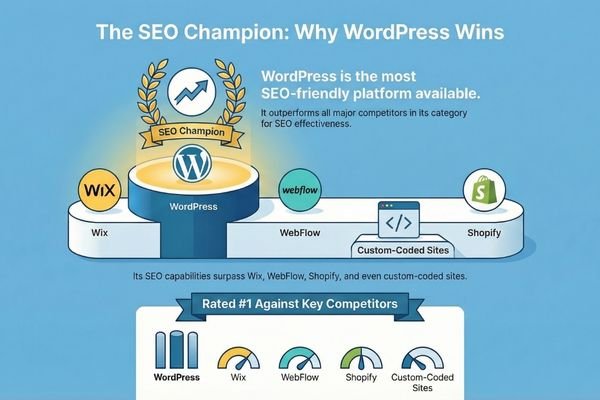
When we compare all the CMS platforms like WordPress, Wix, WebFlow, or Shopify or even custom coded websites, WordPress is the most SEO friendly platform among all.
With ample options of plugins, user-friendly interface. WordPress dominates the SEO approach in web development.
For businesses aiming for organic growth in 2026, this alone makes WordPress a compelling option.
4. Flexibility for Any Use Case
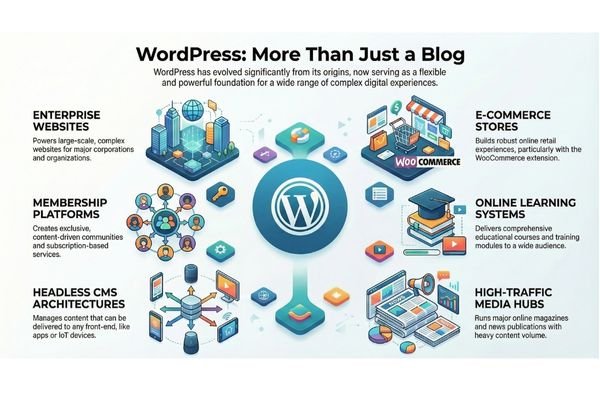
WordPress is no longer just a blogging platform. In 2026, it powers:
a. Enterprise websites b. E-commerce stores with WooCommerce c. Membership platforms d. Online learning systems e. Headless CMS architectures f. High-traffic media publications
This versatility allows businesses to scale without migrating to a new platform later, which saves time, money, and technical risk.
5. Ownership and Control
Unlike many website builders, WordPress gives users full ownership of their content, data, and infrastructure.
You are not locked into pricing changes, feature removals, or platform shutdowns.
As data privacy laws tighten and businesses prioritize digital independence, this control becomes increasingly valuable.
The Challenges of Using WordPress
Despite its strengths, WordPress is not perfect.
Understanding its limitations is crucial for making a smart decision.
1. Maintenance Responsibility
WordPress requires ongoing updates for themes, plugins, and the core system.
Without proper maintenance, websites can become vulnerable or slow.
This is not an issue for teams with technical knowledge or managed hosting, but beginners may find it overwhelming at first.
2. Plugin Overload Risks
There are benefits and drawbacks to the plugins.
Installing too many poorly coded plugins can harm performance, security, and stability.
In 2026, smart plugin selection and performance audits are essential for a healthy WordPress site.
3. Learning Curve Compared to Builders
Platforms like Wix and Squarespace offer faster initial setup with fewer decisions.
WordPress offers more freedom, but that freedom requires learning.
Users who want a website to live in a single afternoon with minimal customization may feel frustrated.
4. Security Depends on Configuration
WordPress itself is secure, but its popularity makes it a frequent target.
Security depends heavily on hosting quality, plugin choices, and user practices.
With proper setup, WordPress can be extremely secure, but it is not entirely hands-off.
WordPress vs. Top Alternatives: Comparison Table
Below is a clear comparison to help you evaluate WordPress against leading alternatives in 2026.
Feature
WordPress
Wix
Shopify
Squarespace
Webflow
Ease of Use
Moderate
Very Easy
Easy
Easy
Moderate
Customization
Very High
Low
Moderate
Low
High
SEO Control
Excellent
Limited
Good
Limited
Very Good
AI Integration
Extensive
Basic
Moderate
Basic
Moderate
Scalability
Excellent
Limited
High for ecommerce
Limited
High
Ownership
Full Ownership
Platform Controlled
Platform Controlled
Platform Controlled
Partial
Cost Flexibility
High
Subscription Based
Monthly Fees
Monthly Fees
Higher Cost
Best For
Any website type
Small sites
Online stores
Portfolios
Designers
Conclusion: Should You Choose WordPress in 2026?
WordPress is not fading. It is evolving.
In 2026, WordPress remains one of the most powerful, adaptable, and future-ready platforms available.
It supports AI-driven content, scales from personal blogs to enterprise systems, and provides unmatched control over digital assets.
That said, it is not the easiest platform, and it does require responsibility.
For users willing to invest in proper setup and maintenance, WordPress offers long-term value that few competitors can match.
If you are planning a website with growth in mind, WordPress is still a strong foundation.
For those exploring strategy, performance, or visibility in an AI-driven web environment, teams like Adsagenz often emphasize thoughtful platform selection as a starting point for sustainable digital success.
Choosing the right foundation today can save years of rebuilding tomorrow.
FAQs
1. Is WordPress still popular in 2025?
Yes, WordPress remains the most popular content management system in 2025. It powers more than 43 percent of all websites globally and continues to grow, especially among businesses seeking SEO strength and content ownership. Its popularity is reinforced by its massive developer community and continuous updates.
2. Is there a future in WordPress?
WordPress has a strong future because it evolves alongside technology trends. Its open-source nature allows it to integrate with AI, headless architectures, and performance tools without being limited by proprietary restrictions. This adaptability ensures its relevance well beyond 2026.
3. Will AI replace WordPress?
AI will not replace WordPress. Instead, AI enhances it. WordPress acts as a foundation where AI tools can operate effectively, helping with content creation, optimization, personalization, and analytics. AI needs structured platforms like WordPress to function at scale.
4. Is there any better than WordPress?
No single platform is universally better. Some alternatives may be better for very specific needs, such as quick portfolios or simple online stores. However, when flexibility, scalability, SEO, and ownership are considered together, WordPress remains difficult to outperform.
5. Is Wix or WordPress better?
Wix is better for beginners who want speed and simplicity with minimal customization. WordPress is better for users who want long-term growth, advanced SEO, and full control over their website. The better choice depends on goals, not popularity.
Website development is one of the most essential digital skills of the modern era. Whether you’re an entrepreneur, student, freelancer, or simply someone curious about how the web works, understanding website development opens doors to infinite opportunities.
Today, we rely on websites for everything: learning, buying, socializing, working, and consuming information. And behind every website lies a blend of creativity, logic, technology, and problem-solving.
This comprehensive guide breaks down the fundamentals of website development in simple terms. No complicated jargon. No advanced-level assumptions.
Just a clear roadmap to help you understand how websites work, what tools developers use, and how you can build your first website step by step.
Understanding How Websites Work?
Before diving into code, every developer must understand the invisible machinery powering websites. At its core, the web operates on the client–server model, which governs how browsers and servers communicate.
When a user enters a URL, the browser sends a request to a remote server, asking for the page’s content.
The server processes the request, gathers all necessary resources such as HTML, CSS, JavaScript, images, and data, and sends them back to the browser. The browser then interprets the files and renders the final output.
What Is a Website?
A website is a collection of web pages stored on a server and accessible through a web browser, such as Chrome, Firefox, or Safari.
Each page contains content — text, images, videos, buttons, links, and animations — all structured using code.
When you enter a URL like www.example.com, you are requesting a specific file or resource that lives on a remote computer called a web server.
How Browsers Communicate With Servers?
Let’s simplify how the browser fetches a website:
You type a URL into your browser.
The browser sends a request to the DNS (Domain Name System) to find the server’s IP address.
The server receives the request.
The server sends the correct files back to the browser.
The browser reads and displays those files for you.
This back-and-forth communication follows a set of rules known as HTTP or HTTPS.
What Is Hosting?
If a website is a home, hosting is the land it stands on.
Hosting providers store the code and files that make up your website on their servers. When visitors access your site, they’re retrieving these files from your hosting space.
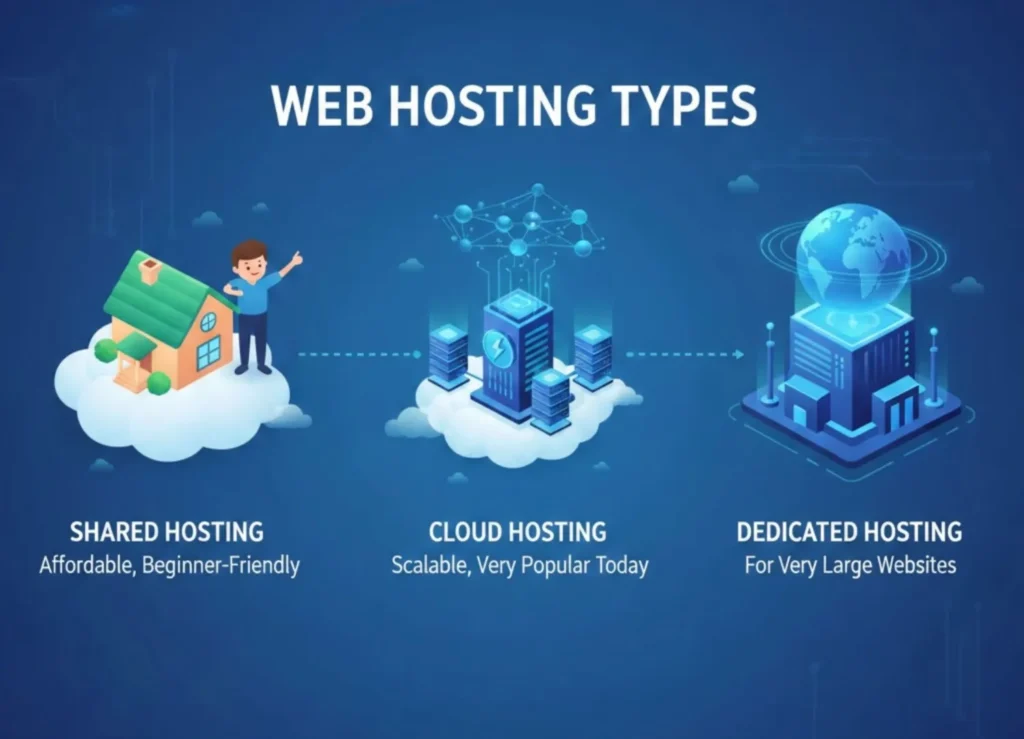
Common hosting types include:
Shared hosting (affordable, beginner-friendly)
VPS hosting (more power, for growing sites)
Cloud hosting (scalable, very popular today)
Dedicated hosting (for very large websites)
What Is a Domain Name?
A domain name is the web address people type to visit your site — like google.com, yourcompany.com, or blogonline.net. It’s your website’s identity on the internet.
A domain is mapped to your server’s IP, so users never need to memorize numbers.
Together, domain + hosting make your website accessible to the world.
Core Building Blocks of the Web
Every website depends fundamentally on three technologies: HTML, CSS, and JavaScript. These might seem basic, but mastering them deeply will set you apart as a strong developer.
a. HTML – The Structure
HTML (HyperText Markup Language) is the structural skeleton of any webpage. Modern HTML emphasizes the use of semantic tags, which give meaning to content.. Modern HTML emphasizes:
Semantic tags like <header>, <main>, <footer>, <article>
Accessibility improvements through proper labels
SEO boosts with a structured layout
Clean code structure that is easy to read and maintain
Good HTML is the backbone of every successful website.
b. CSS – The Styling
CSS breathes life into HTML. From color to spacing to layout, CSS defines the visual presentation.
Important concepts include:
Box model
Selectors and inheritance
Flexbox and Grid, the modern layout systems
Variables and functions such as var(), clamp(), and modern responsive units
Media queries & container queries for responsiveness
Tools like Tailwind CSS, Sass, and PostCSS have transformed how CSS is written today.
c. JavaScript – The Interactivity
JavaScript turns static pages into engaging, dynamic experiences.
Core skills every developer should learn:
ES6+ modern syntax: let/const, arrow functions, classes, modules
DOM manipulation
Fetching data using Fetch API or Axios
Working with JSON
Event handling and state management
JavaScript is the gateway to using frameworks, APIs, and backend technologies.
Modern Frontend Website Development
More advanced website development require more advanced tools. This is where frontend frameworks and libraries enter the picture.
Instead of writing everything from scratch, developers now use frameworks like React, Vue, and Svelte to build reusable, interactive user interfaces quickly.
These frameworks rely on component-driven architecture, where the UI is broken into small units like buttons, modals, or navigation bars.
Each component manages its own data, logic, and appearance, making large applications easier to manage.
a. Frameworks & Libraries
Popular choices include:
React – component-based, large ecosystem
Vue – approachable, flexible, great developer experience
These frameworks help build reusable, scalable UIs.
b. Component-Driven Architecture
A modern website is built with reusable components:
Buttons
Forms
Cards
Navigation menus
Product listings
Components increase maintainability, reduce code duplication, and enable faster development.
c. UI Styling Approaches
Developers now use:
Tailwind CSS (utility-first)
Bootstrap (traditional framework)
CSS-in-JS solutions like styled-components
Design systems like Material UI
These tools streamline design and enforce consistency.
d. Frontend Tooling
Modern development requires tools that improve workflow:
npm, yarn, pnpm for package management
Vite for lightning-fast bundling and development
ESLint & Prettier for code quality
TypeScript for predictable code
These tools ensure developers ship clean, optimized, production-ready applications.
Backend Website Development Essentials
The backend is where data, logic, and user interactions are processed.
Backend website development encompasses server-side languages like JavaScript (Node.js), Python (Django or Flask), PHP (Laravel), Ruby, and Go.
The choice of language often depends on the project’s needs, existing infrastructure, and developer preference.
Backend developers build APIs (Application Programming Interfaces) that handle tasks such as user authentication, data storage, session management, and business logic execution.
A well-designed backend ensures the website remains secure, scalable, and reliable.
Modern backend website development often involves RESTful APIs or GraphQL, both of which define structured ways for the frontend to request data from the server.
a. Server-Side Programming
Popular backend languages:
JavaScript (Node.js)
Python (Django, Flask)
PHP (Laravel)
Go (Gin, Fiber)
Backend responsibilities include:
Processing requests
Managing authentication
Handling business logic
Sending emails, notifications, and background tasks
REST APIs and GraphQL power modern data-driven applications.
b. Databases
Two main types:
SQL Databases (Structured)
PostgreSQL
MySQL
SQLite
NoSQL Databases (Flexible)
MongoDB
Redis
Firestore
Developers use ORMs like Prisma, TypeORM, and Mongoose to interact with databases more easily.
c. Modern Backend Patterns
Modern architecture focuses on scalability:
Microservices break apps into smaller services
Serverless functions like AWS Lambda reduce server maintenance
API gateways improve security and performance
Knowing these patterns prepares you for real-world production systems.
Full-Stack Development Pathways
Full-stack developers bring together both the frontend and backend worlds.
Popular stacks include MERN (MongoDB, Express, React, Node), MEVN (MongoDB, Express, Vue, Node), and frameworks like Next.js or Nuxt, which combine server-side rendering with modern frontend capabilities.
These frameworks simplify complex tasks such as routing, API management, authentication, and data fetching by providing a unified development environment.
As a result, developers can build full-scale applications faster and with cleaner architecture.
Popular stacks:
MERN (MongoDB, Express, React, Node)
MEVN (Vue instead of React)
Next.js (React + server-side rendering)
Nuxt (Vue + SSR)
Remix, SvelteKit, and others
Full-stack frameworks simplify routing, data fetching, API creation, and deployment—all in one system.
Version Control & Collaboration
Version control is vital for both personal and team-based development. Git allows developers to track changes, manage branches, roll back mistakes, and collaborate easily.
Hosting platforms like GitHub and GitLab add features such as pull requests, code reviews, and automated deployments.
Learning Git is non-negotiable for any serious developer; it safeguards your progress and enables efficient teamwork.
Important concepts:
Initializing repositories
Branching and merging
Handling pull requests
Understanding conflicts
Working with GitHub or GitLab
Version control enables teamwork, rollback, and safe experimentation.
DevOps & Deployment
Deploying a website means making it publicly accessible. Modern developers must understand hosting options ranging from simple shared hosting to powerful cloud platforms.
Services like Vercel and Netlify have become favorites because they automate builds, optimize performance, and streamline deployment for frontend applications.
More complex applications may require services like AWS, DigitalOcean, or Render.
DevOps principles such as Continuous Integration and Continuous Deployment (CI/CD) are also crucial.
These practices automate tasks like testing, building, and deploying code whenever updates are pushed.
This reduces human error and accelerates release cycles. Equally important is performance optimization—compressing assets, reducing JavaScript bundle sizes, caching strategically, and improving Core Web Vitals.
A fast website retains visitors and boosts search engine rankings.
a. Hosting Options
Today’s hosting options include:
Vercel and Netlify for frontend frameworks
DigitalOcean and AWS for full server environments
Render and Railway for backend deployment
Static hosting for simple sites
Each platform balances convenience and control differently.
b. CI/CD (Continuous Integration / Continuous Deployment)
Modern teams automate:
Testing
Building
Deployment
Monitoring
CI/CD ensures faster releases with fewer bugs.
c. Website Performance Optimization
Performance matters for SEO and user experience.
Key optimizations:
Minifying code
Lazy loading images
Using CDN delivery
Caching strategies
Image optimization
Reducing JavaScript bundle size
Google’s Core Web Vitals (LCP, FID, CLS) are now essential measurements.
Security Best Practices
With increasing cyber threats, securing your website is more important than ever. Developers must protect their applications from attacks like XSS, SQL injection, CSRF, and brute-force attempts.
This involves validating user inputs, sanitizing data, securing APIs, using HTTPS, encrypting passwords, and implementing rate limits.
Security is not optional; it protects both users and your brand reputation.
Common risks include:
XSS (Cross-Site Scripting)
CSRF (Cross-Site Request Forgery)
SQL Injection
Brute-force attacks
Best practices:
Always validate and sanitize user input
Use secure HTTP headers
Hash and salt passwords (never store plain text)
Enable HTTPS everywhere
Use rate limiting for APIs
Security is not optional; it’s mandatory.
Building for Mobile & Accessibility
Most users browse on mobile devices, so modern websites must be responsive. Responsive design ensures your website adjusts to different screen sizes gracefully.
Techniques such as fluid layouts, flexible images, and media queries help create mobile-friendly experiences.
Accessibility is equally essential. There a millions of users who rely on assistive technologies like screen readers.
Developers must ensure their websites follow WCAG guidelines by providing descriptive alt text, proper labels, keyboard navigation support, and high-contrast visuals.
Progressive Web Apps (PWAs) take this further by enabling offline access, push notifications, and app-like functionality.
a. Responsive Design
Use flexible layouts, fluid grids, and dynamic units. Test on different screen sizes.
b. Progressive Web Apps (PWA)
PWAs allow websites to behave like mobile apps:
Offline access
Push notifications
Home screen installation
c. Accessibility (A11y)
Following WCAG guidelines ensures everyone—including users with disabilities—can access your site.
Key principles:
Proper ARIA labels
Keyboard navigation support
High-contrast color palettes
Alt text for images
Accessibility is a moral, legal, and usability requirement.
Modern Design & UX Principles
User experience (UX) and user interface (UI) design influence how visitors perceive and interact with your website. Good design establishes trust, improves usability, and increases engagement.
Modern UX focuses on clarity, simplicity, visual hierarchy, and intuitive navigation. Typography choices influence readability, while color theory affects emotional response.
Wireframing and prototyping tools like Figma help visualize interfaces early, saving development time and preventing design flaws.
Essential UX concepts:
Visual hierarchy
Gestalt principles
Spacing and alignment
Color theory and consistent palettes
Typography and readability
Wireframing before designing
Interactive prototypes
Tools like Figma, Sketch, and Adobe XD help streamline UI/UX workflows.
Testing Your Website
No website is complete without proper testing. Bugs are inevitable, and testing ensures they don’t ruin the user experience.
Developers perform unit tests to validate small pieces of code, integration tests to ensure components work together, and end-to-end tests to simulate user actions.
Tools like Jest, Cypress, and Playwright automate much of this process.
Testing reduces risks and creates confidence in your final product.
Types of tests:
Unit tests check small pieces of code
Integration tests check interactions
End-to-end tests simulate real user behavior
Performance tests ensure responsiveness
Tools like Jest, Mocha, Cypress, and Playwright are industry standards.
Roadmap for Beginners
For beginners, the journey to mastering web development should be structured and progressive. Start with HTML, CSS, and JavaScript, building small projects to solidify your understanding.
Once you feel confident, learn a frontend framework like React or Vue. Gradually transition to backend concepts, learning Node.js or Python, and connect your applications to a database.
Explore full-stack frameworks, then learn Git and deployment techniques. Over time, focus on best practices, security, performance, and advanced ecosystem tools.
Growth happens through consistent practice, curiosity, and building real projects.
1. Start with fundamentals
HTML → CSS → JavaScript Learn deeply, not quickly.
2. Build small projects
Start with landing pages, to-do apps, and portfolio sites.
3. Learn a framework
React, Vue, or Svelte.
4. Move to backend
Learn Node.js or Python and build CRUD apps.
5. Add databases
Learn SQL + NoSQL basics.
6. Explore full-stack frameworks
Next.js, Remix, or SvelteKit simplify modern development.
7. Learn Git and deployment
Push to GitHub and deploy projects online.
8. Keep improving
Stay updated, follow tutorials, join communities, and contribute to open-source.
Conclusion
Modern website development is an ever-evolving field that blends creativity, logic, and problem-solving. As technology continues to advance, developers must stay curious, adaptable, and committed to learning.
Mastering the fundamentals of HTML, CSS, and JavaScript, understanding backend technologies, exploring full-stack frameworks, and staying updated with design and performance standards will enable you to build fast, professional, and user-friendly websites.
Whether you want to pursue a career in tech or build something meaningful for yourself, this guide serves as your comprehensive starting point.
And if you ever need expert help bringing your ideas to life, Adsagenz offers professional website development services to support your journey from concept to a fully functional, high-performance website.
FAQs
1. What is the difference between frontend and backend development?
– Frontend focuses on what users see and interact with—layout, design, responsiveness, and interactivity (HTML, CSS, JS, frameworks like React).
– Backend handles data, logic, authentication, APIs, and communication with databases (Node.js, Python, PHP, SQL/NoSQL).
2. Do I need hosting and a domain to publish a website?
Yes. – Hosting stores your website’s files on a server. – Domain is your website’s unique address (e.g., yoursite.com). Both work together to make your site accessible online.
3. How long does it take to develop a website?
The timeline depends on the project’s complexity. – Simple websites: 5–10 days – Business/portfolio websites: 2–4 weeks – E-commerce or custom web applications: 1–3 months
We provide a project timeline after understanding your requirements.
4. How much does a professional website cost?
Costs vary based on features, design complexity, pages, and integrations. A basic website may start from affordable packages, while advanced or e-commerce sites require a higher budget. We offer customized quotes based on your needs.
5. Do you provide website maintenance after development?
Yes. We offer ongoing maintenance, including updates, backups, security checks, performance monitoring, and content changes to keep your website running smoothly.
6. Will my website be SEO-friendly?
Yes. We follow SEO best practices such as clean code, fast loading speed, mobile optimization, proper metadata, and structured content to improve your visibility on search engines.