Category: Ads

  • The Complete Guide to Profitable Ads Management

    The Complete Guide to Profitable Ads Management

    Table of Contents

    If there’s one thing I’ve learned after years of running ad campaigns for everyone from small-town bakeries to growing startups, it’s this — running ads is easy, but making them profitable takes real skill.

    Anyone can hit that “Boost Post” button or throw together a quick Google Ads campaign. But if you want ads management strategies and want your dollars to multiply instead of vanish overnight, you’ve got to understand how ads actually work — how targeting, budgeting, testing, and scaling all come together behind the scenes.

    That’s what this guide is all about. In this complete guide to profitable ads management, we’ll go beyond theory and focus on the practical side of advertising. Whether you’re a hands-on business owner tired of guessing what works on Facebook, or a marketing manager chasing a higher ROI, you’ll find a clear, no-fluff roadmap here — built on real-world lessons that actually deliver results.

    What Exactly Is Ads Management?

    Before we jump into budgets, metrics, and strategies, let’s clear up what ads management really means.

    In simple terms, ads management is the process of planning, running, analyzing, and optimizing your advertising campaigns across platforms like Google, Facebook, Instagram, YouTube, TikTok, or LinkedIn.

    But good ads management isn’t just about placing ads. It’s about:

    1. Understanding your audience behavior.
    2. Tracking key performance metrics (CTR, ROAS, CPA, etc.).
    3. Tweaking campaigns until you find the “sweet spot” where cost and results balance perfectly.

    Think of it like running a well-oiled machine –  every lever, setting, and gear matters.

    Why Profitable Ads Management Is the Heart of Modern Business

    Every dollar counts in advertising. Whether you’re spending ₹500 a day or $5,000 a month, the principle stays the same:

    “You don’t need to spend more –  you need to spend smart.”

    Good ads management is what separates profitable businesses from those constantly “testing” but never scaling.

    It’s how small brands grow into household names, and how large companies maintain dominance.

    Here’s what profitable ads management actually does for you:

    1. Saves money by eliminating wasteful ad spend.
    2. Improves returns through audience precision.
    3. Builds brand awareness with consistency.
    4. Strengthens customer retention with retargeting.
    5. Creates data-driven decision-making instead of guesswork.

    The Key Foundations of Profitable Ads Management

    There are four pillars that every successful campaign rests on.
    Miss one, and even the best-looking ad can flop.

    1. Understanding Your Target Audience

    If your ad isn’t speaking to the right person, it’s money down the drain.

    Before you even create a single ad, answer these:

    • Who is your ideal customer?
    • What problem are they trying to solve?
    • Where do they spend time online?
    • What emotions drive their buying decision?
    Illustration of diverse group of people representing a target audience.

    Modern ad platforms like Meta and Google give you detailed targeting tools, but those tools only work if you already know who you’re trying to reach.

    Pro tip:

    Don’t just target “everyone interested in travel.” Instead, target frequent travelers aged 30–50 who book last-minute trips. Specificity multiplies profits.

    2. Setting Clear, Measurable Goals

    You’d be surprised how many businesses spend on ads without defining success.

    Ask yourself –  are you looking for:

    • Leads?
    • Sales?
    • Website visits?
    • App installs?
    • Brand recognition?

    Once you define your objective, your entire campaign structure –  from bidding strategy to ad creative –  becomes easier to plan.

    Example:

    a. If your goal is sales, optimize for conversions, not clicks.

    b. If your goal is brand awareness, optimize for reach and impressions.

    3. Choosing the Right Platform

    Not every platform works for every business.

    Each one has its strengths:

    1. Google Ads → Great for intent-based traffic (“I need this now”).
    2. Facebook/Instagram Ads → Best for storytelling and visual persuasion.
    3. LinkedIn Ads → Perfect for B2B and professional targeting.
    4. YouTube Ads → Excellent for long-form awareness and brand credibility.
    5. TikTok Ads → Ideal for fast-growing consumer brands targeting Gen Z.
    Logos of Google Ads, LinkedIn, Facebook, Instagram, YouTube, and TikTok with text 'Digital Advertising Platforms'.

    Start with one or two platforms where your audience actually hangs out, then expand.

    Chasing every platform only dilutes your focus and budget.

    4. Crafting Winning Ad Creatives

    Your ad creative is what people see first –  and decide in three seconds whether to stop scrolling or not.

    It’s not just about pretty images; it’s about message–market match.

    Great ad creatives usually check these boxes:

    1. Clear headline with an immediate hook.
    2. Compelling visual (photo, video, or animation).
    3. Direct call to action (“Shop Now,” “Learn More,” “Get Quote”).
    4. Honest tone –  people can smell exaggeration a mile away.

    Remember: in the ad world, emotion drives action.
    Facts build trust, but emotion makes them click.

    Budgeting: The Smart Way to Spend on Ads

    One of the biggest questions I hear:

    “How much should I spend on ads?”

    Well, it depends –  but not on luck.

    Step 1: Start with Your Numbers

    Before you spend, you need to know your:

    1. Average order value (AOV)
    2. Profit margin
    3. Conversion rate
    4. Customer lifetime value (LTV)

    Let’s say your product sells for $50 and your profit margin is 40%.
    That means you make $20 profit per sale.

    If your ads are costing you $25 to acquire a customer, you’re losing $5 per order –  no matter how good your creatives look.

    That’s why profitable ads management is mathematics first, marketing second.

    Step 2: Test Small, Then Scale

    Every good campaign starts as a test.

    Run multiple ad variations (creatives, audiences, copies) with small budgets.

    Track results for at least 7–10 days before scaling.

    Scale what works, pause what doesn’t.

    Never dump your whole budget into an untested ad.

    Step 3: Allocate Wisely

    Here’s a simple rule:

    1. 70% → Core campaigns (your proven ads)
    2. 20% → Testing new creatives or audiences
    3. 10% → Experimental (new platforms or bold ideas)

    This keeps your ad engine running while constantly learning.

    Tracking Metrics That Actually Matter

    Most people chase vanity metrics like likes, reach, and impressions.

    But profitability lies in a few key numbers.

    Here are the big ones:

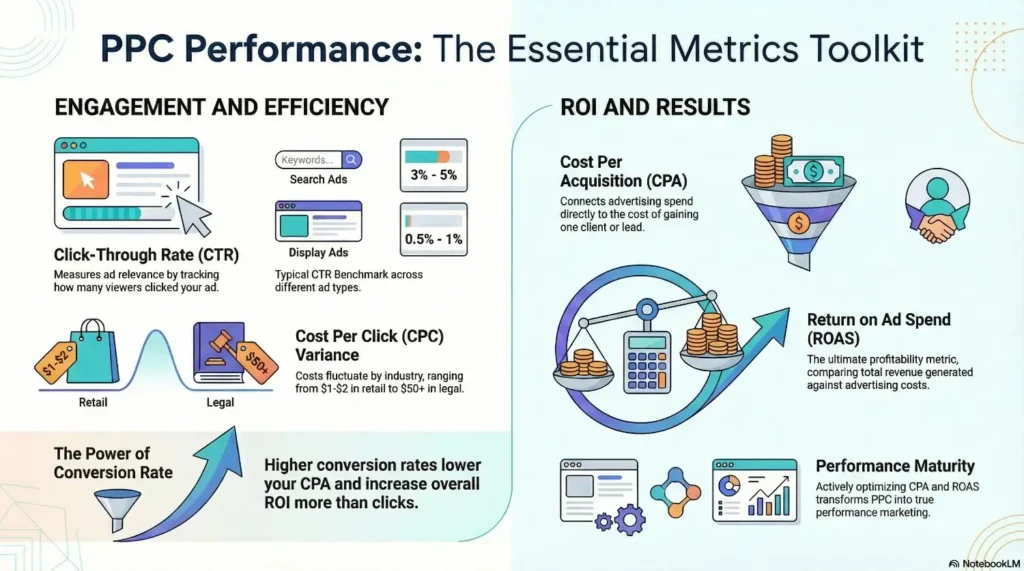
    1. CTR (Click-Through Rate) → Are people interested in your ad?
    2. CPC (Cost Per Click) → How much are you paying for attention?
    3. CPA (Cost Per Acquisition) → How much are you paying for a sale or lead?
    4. ROAS (Return on Ad Spend) → The ultimate number. $5 ROAS = $5 earned for every $1 spent.
    5. LTV (Lifetime Value) → How much each customer is worth over time.

    Focus on ROAS and CPA –  those two determine whether your ads are profitable or not.

    Ad Testing: The Science Behind Winning Campaigns

    Ads management isn’t guesswork; it’s a cycle of test, analyze, adjust, repeat.

    A proper testing phase looks like this:

    1. Run 3–5 ad variations with different creatives and hooks.
    2. Keep all other settings identical (budget, targeting).
    3. After a few days, compare performance –  clicks, conversions, ROAS.
    4. Scale the winner, kill the losers, and make new variations.

    That’s the secret behind high-performing ads: constant micro-adjustments instead of random overhauls.

    Understanding Ad Fatigue and Refreshing Creatives

    Even the best ads eventually stop performing.

    People get used to seeing them, and performance drops –  that’s ad fatigue.

    When that happens:

    1. Change your headline or visual.
    2. Refresh your offer.
    3. Adjust your audience slightly.

    Sometimes even changing a thumbnail or first 3 seconds of a video can double your CTR again.

    Common Mistakes That Destroy Ad Profitability

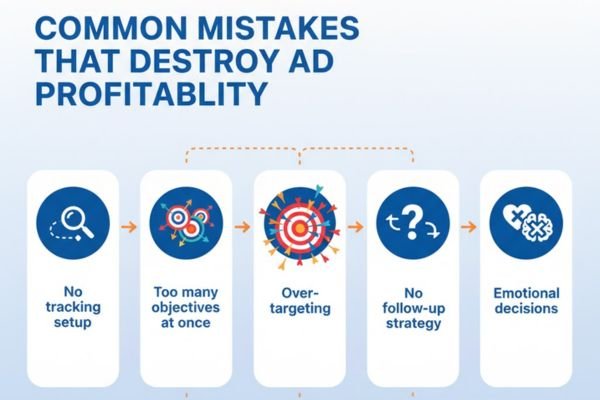
    I’ve seen smart marketers burn through thousands by repeating these same five mistakes:

    1. No tracking setup – Not installing pixels or conversion tags.
    2. Too many objectives at once – Mixing awareness, traffic, and conversions in the same campaign.
    3. Over-targeting – Narrowing the audience so much that ads stop delivering.
    4. No follow-up strategy – Ignoring retargeting and email nurturing.
    5. Emotional decisions – Turning off ads too early or panicking over day-to-day fluctuations.
    Infographic listing common ad mistakes: no tracking setup, too many objectives, over-targeting, no follow-up strategy, emotional decisions.

    Remember: ads are data-driven.

    Let the numbers talk before your emotions do.

    The Role of Retargeting in Profitability

    Here’s where most profits are hiding –  in your retargeting campaigns.

    Only 2–3% of people buy the first time they see your ad.

    But when you follow up with retargeting –  showing ads to those who already visited your website or added to cart –  your conversion rates often triple.

    Retargeting is where the magic happens:

    1. It keeps your brand top of mind.
    2. It converts warm leads into buyers.
    3. It drastically lowers your cost per acquisition.

    If you’re not running retargeting, you’re leaving easy money on the table.

    If Part 1 was about understanding the foundation of profitable ad campaigns, this one’s about sharpening your edge –  the techniques that separate amateurs from professionals.

    Once you’ve mastered targeting, creative, and budgeting, the real game begins: optimization and scaling. That’s where the serious profits lie.

    Let’s break it all down, step by step, using real-world logic, not marketing jargon.

    Scaling Up: Turning Small Wins into Big Results

    Scaling is every advertiser’s dream –  you find a campaign that works, then pour more money into it without losing profitability.
    But if you’ve ever tried this, you know it’s not as simple as doubling your budget.

    The secret to scaling is structured control. You increase spend gradually, monitor performance closely, and adjust what needs tweaking before things spiral out of control.

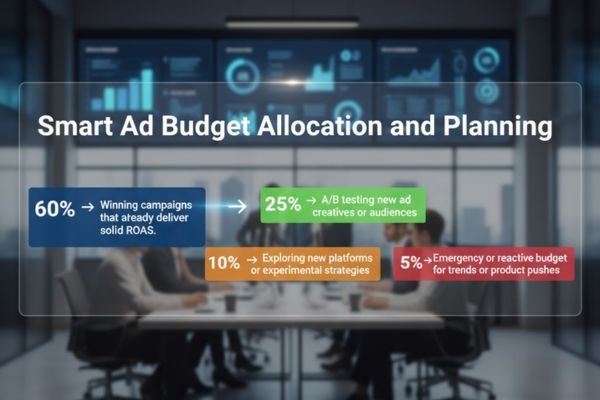
    1. Smart Ad Budget Allocation and Planning

    One of the core elements of profitable scaling is ad budget allocation and planning.

    Here’s a structure I recommend:

    1. 60% → Winning campaigns that already deliver solid ROAS.
    2. 25% → A/B testing new ad creatives or audiences.
    3. 10% → Exploring new platforms or experimental strategies.
    4. 5% → Emergency or reactive budget for trends or product pushes.
    Chart showing ad budget allocation with percentages for campaigns, A/B testing, new platforms, and emergency budgets.

    You’ll notice we never put 100% in one basket. Good ads management strategies are about balance –  protecting your profits while discovering new opportunities.

    2. Maintain ROAS (Return on Ad Spend) Maximization

    When scaling, ROAS (Return on Ad Spend) maximization should remain your north star.

    Here’s a simple rule:

    If ROAS drops below your profitability threshold, pause and analyze.

    Scaling too fast without checking ROAS can drain your margins in days. Always increase budget by 10–20% increments and give algorithms time to adjust.

    Platforms like Facebook and Google reward consistency, not chaos.

    Mastering Platform-Specific Ad Strategies

    Every advertising platform has its own personality –  what works on one won’t necessarily work on another.

    Let’s look at how to handle Google Ads campaign management and Facebook Ads strategy and setup –  the two giants of digital advertising.

    1. Google Ads Campaign Management

    Google Ads runs on intent. People are already searching for something specific, so your job is to appear exactly when they’re ready to buy.

    Here’s what strong Google Ads management looks like:

    1. Use Keyword Match Types Smartly

    Mix broad match modifiers for reach, phrase match for context, and exact match for high-converting queries.

    2. Negative Keywords Are Your Best Friend

    Add irrelevant terms to your negative list regularly to save budget.

    3. Segment by Intent

    Separate campaigns for awareness (“what is X”), comparison (“best X near me”), and conversion (“buy X online”).

    4. Ad Extensions

    Add sitelinks, callouts, structured snippets, and phone numbers to increase click-through rates.

    And always monitor Search Term Reports –  they’re gold for discovering what real customers are typing.

    2. Facebook Ads Strategy and Setup

    Unlike Google, Facebook Ads are interruption-based –  people aren’t searching, you’re grabbing their attention.

    A great Facebook Ads management strategy and setup focuses on emotional storytelling and precise audience layering.

    Key points:

    1. Create Separate Ad Sets for cold, warm, and retargeting audiences.

    2. Use Dynamic Creative Testing to automatically rotate headlines and visuals.

    3. Start with CBO (Campaign Budget Optimization) to let Facebook allocate money to top-performing ad sets.

    4. Retarget Website Visitors with offers, testimonials, or urgency-based messages.

    Remember: Facebook’s algorithm loves data. The more consistent you are, the better it learns who your ideal customer is.

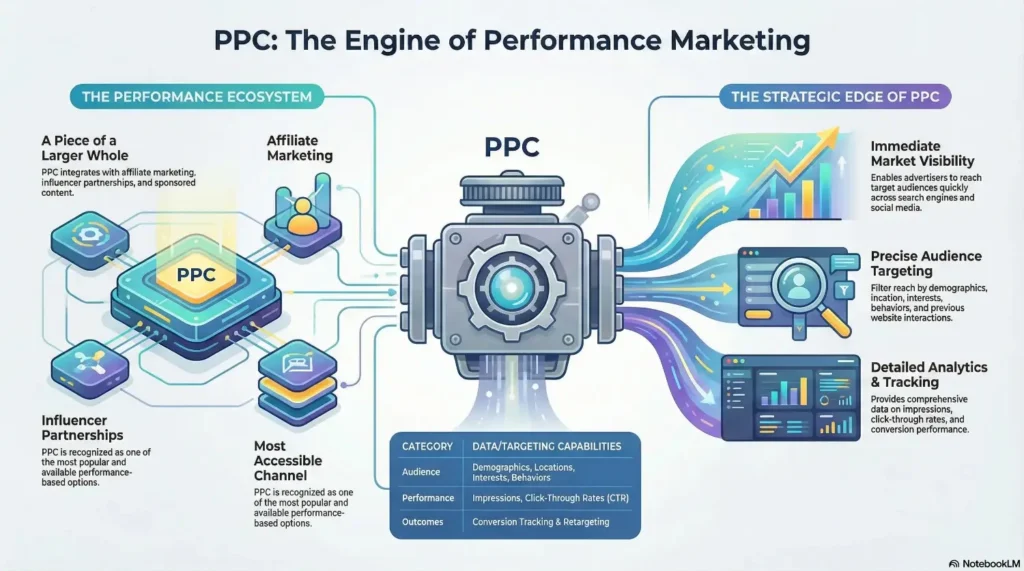
    PPC Campaign Optimization: The Continuous Process

    Whether it’s Google, Bing, or social media ads, PPC campaign optimization (Pay-Per-Click) is the heartbeat of profitable ads management.

    Optimization isn’t a one-time setup –  it’s an ongoing process.
    You keep trimming the fat, testing new versions, and refining everything from copy to bids.

    Key Optimization Tasks Every Manager Should Do Weekly

    1. Review Search Queries – Remove irrelevant clicks that waste budget.

    2. Adjust Bids – Increase bids on high-performing keywords and lower them for poor ones.

    3. Rotate Ad Copy – A/B test new angles, headlines, and CTAs.

    4. Monitor Quality Scores – Improve relevance and landing page experience.

    5. Reallocate Budget – Move money toward campaigns with better conversion rates.

    Great PPC campaign optimization is really about attention to detail –  noticing trends early before they become costly.

    A/B Testing Ad Creative –  The Science Behind Winners

    If I could give one secret to every advertiser out there, it would be this:

    “Never assume –  always A/B test.”

    A/B testing ad creative means running two or more versions of the same ad with one element changed at a time –  headline, image, CTA, or audience.

    Here’s how to do it effectively:

    1. Test One Variable at a Time

    If you change five things at once, you’ll never know what worked.

    2. Collect Enough Data

    Don’t judge results overnight. Wait for at least 1,000 impressions or a full week.

    3. Keep a Log

    Note which ad version won and why –  build your own playbook.

    4. Iterate

    Take your best performer, tweak one more thing, and test again.

    A/B testing ad creative is what separates consistent profits from random luck.

    Over time, these micro-optimizations stack up into massive performance gains.

    Ad Performance Reporting and Analysis

    Data without insight is just noise.

    That’s why ad performance reporting and analysis is at the heart of every good campaign.

    You don’t need a fancy dashboard –  you just need clarity.

    Here’s what I recommend tracking weekly or biweekly:

    MetricWhat It Tells You?Ideal Goal
    CTRHow engaging your ad is1.5%+ for search, 0.8%+ for social
    CPCHow much you pay for clicksDepends on industry
    CPACost per sale/leadMust stay below profit margin
    ROASOverall profitabilityMinimum 3x for scaling
    FrequencyHow often the same person sees your adKeep below 4–5
    Conversion RateHow well visitors take action2–5% average

    These numbers tell you whether your ads management strategies are working –  and more importantly, where to focus next.

    Automation and Tools to Make Ads Management Easier

    Managing multiple campaigns manually is exhausting. Thankfully, automation tools help simplify it all.

    Consider using:

    1. Google Ads Scripts to pause low-performing keywords.
    2. Meta’s Advantage+ for automatic budget optimization.
    3. Third-party dashboards like Supermetrics or Databox for unified reporting.

    Automation should enhance your strategy, not replace it.

    You still need human judgment to interpret data, make creative decisions, and plan budgets intelligently.

    Long-Term Ads Management Strategies

    The most profitable advertisers think long-term. They’re not chasing this week’s click rate –  they’re building a brand that keeps customers returning.

    Here are timeless ads management strategies to sustain profitability year-round:

    1. Focus on Lifetime Value (LTV)

    Measure what a customer is worth over 12 months, not just one purchase.

    2. Layer Retargeting with Email and SMS

    Don’t rely on ads alone –  follow up through owned channels.

    3. Seasonal Budget Adjustments

    Plan your ad budget allocation and planning around buying cycles –  e.g., holiday surges or slow summers.

    4. Creative Refresh Schedule

    Update your ads every 30–45 days to prevent fatigue.

    5. Regular ROAS Reviews

    Every quarter, deep dive into your ROAS maximization numbers to reallocate resources.

    When you approach advertising as a continuous cycle –  not a one-off campaign –  your profits become predictable.

    Bringing It All Together

    At its core, profitable ads management is a blend of art and science.

    It’s knowing how to craft emotion-driven messages and backing them with precise data analysis.

    1. You plan smartly.
    2. You track ruthlessly.
    3. You test endlessly.
    4. And you scale patiently.

    That’s the formula that keeps your ad engine running smoothly –  whether you’re doing a google ads management or a facebook ads management, or a full-blown PPC campaign network.

    Final Thoughts

    If Part 1 taught you what ads management is, Part 2 should leave you confident about how to make it profitable.

    Keep these five principles at your core:

    1. Respect your budget.
    2. Test and optimize constantly.
    3. Make decisions by data, not emotion.
    4. Focus on ROAS, not vanity metrics.
    5. Build systems that grow, not campaigns that fade.

    Advertising isn’t about chasing quick wins –  it’s about creating an engine that pays you back every single day.

    Frequently Asked Questions

    1. What are the most effective ads management strategies for small businesses?

    Small businesses should focus on spending smart, not big. Set clear goals, allocate budgets carefully, and track performance weekly. Use A/B testing to find high-performing creatives, retarget website visitors, and monitor ROAS regularly. The key is to track, tweak, and test continuously to make every dollar count.

    2. How do I optimize a PPC campaign for better performance and ROI?

    Optimize PPC by refining keywords, bids, and ad copy. Review search terms to cut wasted clicks, test ad variations, and adjust bids based on results. Keep improving Quality Score and landing page relevance. Always track ROAS — it’s the best measure of profitability.

    3. What’s the difference between Google Ads campaign management and Facebook Ads strategy and setup?

    Google Ads targets intent — people actively searching for products. It relies on keyword optimization and bids. Facebook Ads target interests — people likely to be interested based on behavior and demographics. Use Google for ready-to-buy traffic and Facebook for awareness and retargeting.

    4. How do I plan my ad budget to get consistent results?

    Use this simple breakdown: 60% for proven campaigns, 25% for testing, 10% for experiments, and 5% for trends or quick tests. Scale slowly, track ROAS closely, and adjust budgets based on performance to maintain steady results.

    5. How can I measure and report ad performance effectively?

    Track core metrics weekly: CTR (engagement), CPC (cost per click), CPA (cost per lead/sale), ROAS (profitability), and Conversion Rate (effectiveness). Use a simple dashboard to spot trends — if ROAS and conversions are rising, your strategy is working.

  • 10 Tips to Supercharge Your Facebook Ads

    10 Tips to Supercharge Your Facebook Ads

    In 2025, utilizing Facebook ads may be one of the most effective strategies for expanding your company’s online presence. The platform, with billions of active users, enables you to precisely target your ideal audience.

    But merely launching campaigns is insufficient. You must optimize your Facebook ads to get the most return on investment for each dollar spent if you want to see tangible results.

    Effective ad optimization raises conversion rates, lowers cost per click, and increases return on investment.

    We’ll go over ten practical suggestions in this blog post that you can use right now to increase the effectiveness and impact of your Facebook ads.

    These tactics can help you advance your campaigns, from knowing your goal to improving your budget, targeting, and creatives.

    1. Understand Your Audience

    Understanding your target market is the first step in Facebook ad optimization. Even the most creative ads are ineffective without accurate targeting.

    You may improve your approach by using Facebook Audience Insights to examine demographics, interests, and activity.

    Additionally, you can create bespoke audiences and re-engage warm leads by using your own data, such as website visitors, app users, or email subscribers.

    By identifying new individuals who resemble your top clients, lookalike audiences let you reach a wider audience.

    Segmenting your audience by geography, age, gender, interests, or desire to buy is crucial.

    Segment-specific personalized messaging increases engagement, optimizes return on investment, and minimizes wasteful spending.

    You can make sure that the appropriate individuals see your advertising at the right moment by fusing data with astute segmentation.

    2. Define Clear Objectives

    Facebook ad optimization begins with setting up quantifiable goals. Campaigns that lack specific objectives run the danger of going over budget, focusing on the incorrect audience, and producing subpar outcomes.

    Your advertisements will be in line with business priorities if you select the appropriate goal in Ads Manager:

    a. Brand Awareness: Build visibility and reach new audiences.

    b. Lead Generation: Collect emails, sign-ups, or inquiries.

    c. Conversions: Drive bookings or purchases.

    d. Sales: Focus on direct revenue or e-commerce.

    Facebook’s algorithm makes recommendations based on your selected goal.

    Picking interaction, for instance, can result in likes but not sales. Always match your goals with the stage of your client journey to optimize return on investment.

    3. Optimize Ad Creatives

    Because consumers notice visuals first, ad creatives are essential to optimizing Facebook ad performance, which in turn drives engagement and conversions.

    Make use of crisp, attractive photos with colors, typefaces, and designs that are consistent with your brand. Make layouts eye-catching but simple.

    Videos typically perform better than pictures, especially short-form content that grabs viewers’ interest fast, such as Reels and Stories.

    For displaying several items or features in a single advertisement, carousels are perfect.

    Regularly experiment with various creative forms to determine which ones your audience responds to the most to improve results.

    What motivates clicks, engagement, and conversions is revealed by creative testing. You can make sure your campaigns have a greater effect and generate more revenue by constantly improving your images.

    4. Write Compelling Ad Copy

    Writing persuasive ad copy is key to optimizing Facebook Ads. The correct words attract interest, pique curiosity, and motivate action.. Focus on three areas:

    a. Strong headlines & CTAs: Headlines should hook instantly, while CTAs guide the next step.

    b. Value-driven messaging: Highlight benefits, not just features—show how you solve their problems.

    c. Clarity & brevity: Keep language short, simple, and persuasive to maintain engagement.

    This image tells about the tips to write compelling facebook ads copy

    When your copy resonates, it builds trust and motivates clicks. Keep testing variations to find the headlines and CTAs that convert best.

    5. Leverage A/B Testing

    One of the best ways to optimize Facebook Ads is through A/B testing. Test different ad elements like creatives (images, videos, carousels), headlines, call-to-action buttons, and placements (feeds, stories, reels).

    Track metrics such as CTR, CPC, and conversions to see which variations perform best. Use the winning versions to scale your campaigns and maximize results.

    Keep A/B testing as a continuous process to ensure your ads stay effective and aligned with your audience.

    6. Refine Targeting with Retargeting

    To optimize Facebook Ads, focus on people who already know your brand. Retargeting allows you to get back in touch with people who expressed interest but didn’t buy.

    With Facebook Pixel, you can track activity and re-engage your warm audience to drive action. Effective retargeting strategies include showing ads to website visitors, cart abandoners, people who engaged with your posts or videos, and using dynamic product ads with personalized recommendations.

    This ensures your budget targets the most valuable audience, boosting conversions and lowering acquisition costs.

    7. Set the Right Budget & Bidding Strategy

    To optimize Facebook Ads, set a budget aligned with your goals while keeping costs in check. Stay clear of early overspending by starting small, testing, and scaling up gradually.

    You can choose a lifetime budget for campaigns with uniform distribution over a set period of time, or a daily budget for consistent spending.

    For bidding, automated bidding is ideal if you’re new or want Facebook’s algorithm to maximize results at the lowest cost.

    If you have experience and clear benchmarks, manual bidding gives more control. Balancing budget and bidding strategies helps boost ROI.

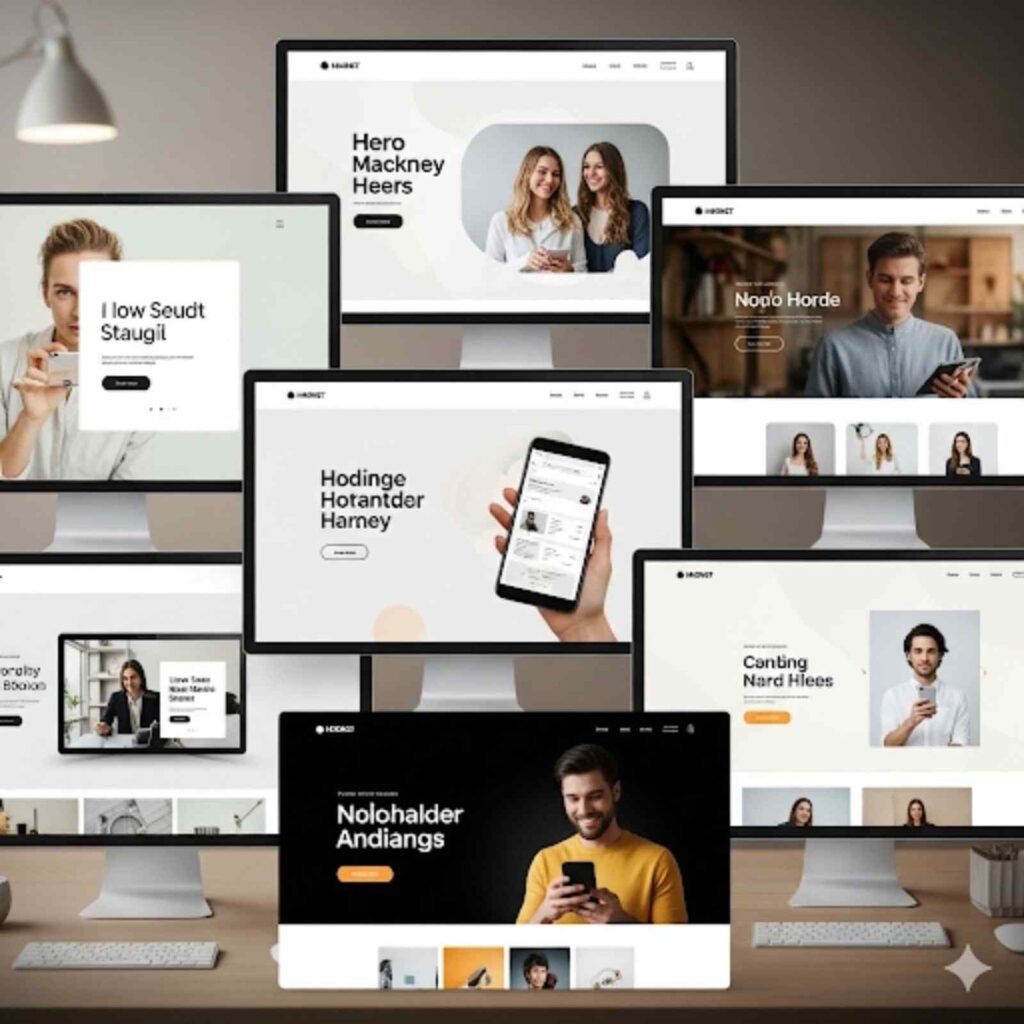
    8. Optimize Landing Pages

    One of the best ways to optimize Facebook ads is to ensure the landing page delivers exactly what the ad promises. A strong ad drives clicks, but if the page is slow, irrelevant, or confusing, users will leave before converting.

    This image is about the tips to optimzie landing pages for facebook ads

    To maximize results, keep ad copy and landing page content consistent, prioritize mobile-first design with fast load speeds, use a clear call-to-action, and create a simple, distraction-free experience.

    Aligning your ad and landing page reduces bounce rates and boosts conversions, making every advertising dollar work harder.

    9. Track & Analyze Performance

    To optimize Facebook ads, track and analyze performance regularly. Key metrics to monitor include:

    a. CTR (Click-Through Rate): Measures engagement

    b. CPC (Cost Per Click): Shows cost-efficiency

    c. ROAS (Return on Ad Spend): Indicates profitability

    d. Conversion Rate: Reveals ad effectiveness

    Use Facebook Ads Manager for detailed reports and connect with Google Analytics to track website activity.

    Analyzing these insights helps refine targeting, adjust budgets, and improve creatives. Consistent monitoring maximizes ROI and ensures better ad results.

    10. Stay Updated with Facebook Algorithm Changes

    To optimize Facebook Ads, staying updated with the platform’s frequent algorithm changes is crucial. New tools and features can directly impact ad performance, giving adaptive marketers a clear edge over those using outdated methods.

    This image is about how stay updated and alert of ongoing facebook algorithm changes

    Key areas to watch include Advantage+ campaigns, which simplify ad creation with automation, and AI-driven tools that enhance targeting, bidding, and creative recommendations.

    By consistently monitoring updates and testing new features, you keep your ads competitive, cost-efficient, and aligned with Facebook’s best practices.

    Final Words!

    To succeed with paid campaigns, you must optimize your Facebook Ads for maximum impact. The 10 tips shared will help refine targeting, improve creatives, cut costs, and boost conversions.

    From testing ad formats to crafting strong copy and tracking performance, small tweaks can drive big results. Now it’s your turn to apply these strategies and unlock better ROI.

    Ready to scale faster? Adsagenz can help with proven methods to grow smarter with Facebook Ads. Contact Adsagenz today.

  • Google Ads vs. Facebook Ads: Which is more effective?

    Google Ads vs. Facebook Ads: Which is more effective?

    Introduction

    Online advertising has become a critical part of business growth in 2025. Whether you’re a local coffee shop or a global e-commerce store, running ads online helps you connect directly with your ideal customers.

    But here’s the big question every marketer and business owner is asking: Google Ads vs Facebook Ads — which one is more effective?

    Both platforms are giants in the digital advertising space. Google processes over 8.5 billion searches every day, while Facebook (now part of Meta) has over 3 billion monthly active users across its apps. But these platforms work very differently.

    The purpose of this blog is to help you compare them side-by-side.

    We’ll cover how each platform works, the benefits of Facebook Ads and Google Ads, how to measure conversion rates, and ultimately help you decide where to invest your ad budget for the highest ROI.

    What are Google Ads?

    Google Ads is a pay-per-click (PPC) advertising platform created by Google. Businesses use it to appear at the top of Google’s search results and across the Google Display Network, YouTube, and even in Gmail inboxes.

    When someone types a search like “emergency plumber near me,” Google shows ads from companies that have paid to appear for that keyword. This is called search intent — users are actively looking for something they need.

    With Google Ads, you bid on keywords, and if your ad wins the auction, it shows up to users. You only pay when someone clicks — that’s where the term cost-per-click (CPC) comes in.

    Here are some key benefits of Google Ads:

    a. High buyer intent: You reach users at the exact moment they’re searching for a solution.

    b. Fast results: Ads can start showing within minutes of approval.

    c. Massive reach: Google’s search engine and partner networks give you access to billions of daily users.

    d. Detailed tracking: Google’s ad dashboard integrates seamlessly with Google Analytics to track clicks, conversion rates, and more

    Curious about how it works in detail? Read Google’s official guide here: Google Ads Help Center

    What are Facebook Ads?

    Facebook Ads, managed under Meta Ads Manager, lets businesses advertise across Meta’s platforms: Facebook, Instagram, Messenger, and the Audience Network.

    Unlike Google Ads, where users search for what they want, Facebook Ads are discovery-based. You’re showing ads to users based on their interests, behaviors, and demographics — not necessarily because they searched for your product.

    For example, you might advertise fitness equipment to users who like fitness pages, follow personal trainers, or belong to wellness groups. This makes Facebook Ads incredibly powerful for brand discovery, storytelling, and retargeting.

    Key benefits of Facebook Ads include:

    a. Precision targeting: Target by age, gender, job title, interests, purchase history, or create custom audiences.

    b. Creative flexibility: Use videos, carousels, stories, and reels to showcase products.

    c. Cost-effective: Lower CPC than Google Ads in many industries.

    d. Engagement-driven: Users can like, comment, share, or save your ads — turning one view into organic reach.

    The platform also provides a user-friendly dashboard to manage and optimize campaigns. When paired with the Facebook Pixel, it gives deep insights into how users behave after clicking on your ad — including how many converted.

    Want more technical insights? Explore Meta’s Ads Manager documentation: Meta Business Help Center

    Targeting Capabilities Compared

    One of the biggest differences between Google Ads vs Facebook Ads lies in how you target your audience. Both platforms allow businesses to reach highly specific users, but their methods reflect different user behaviors and intentions.

    A. Google Ads: Reaching People with High Intent

    Google Ads uses intent-based targeting. That means your ads show up when people actively search for something relevant to your product or service. You choose keywords, and Google displays your ad when users enter those terms.

    For example, someone typing “emergency plumbing in Chicago” is likely ready to hire a plumber. Your ad appears at the perfect moment — when they’re ready to act. This type of targeting leads to higher conversion rates, especially in industries where timing is critical.

    Key benefits:

    Targets people with clear purchasing intent
    – Useful for businesses with niche or time-sensitive services
    – Helps reduce wasted ad spend by narrowing in on specific CPC keywords.

    Learn more about Google Ads targeting options here: Google Ads Audience Targeting

    B. Facebook Ads: Discovery and Behavioral Targeting

    Facebook, on the other hand, doesn’t wait for people to search. Instead, it lets you target users based on who they are — their interests, online behavior, location, relationship status, age, job titles, and more.

    You can even create Lookalike Audiences, which are new users who behave like your existing customers.

    This is great for:

    – Raising brand awareness
    – Introducing products to new audiences
    – Building emotional connection through visual storytelling

    While the users may not be ready to purchase immediately, they can be nudged through the sales funnel with consistent messaging and retargeting.

    Read Facebook’s full targeting guide here: Meta Audience Targeting

    Ad Formats and Creative Potential

    Another major difference between Google Ads vs Facebook Ads is the range of ad formats each platform offers. This impacts how your message is delivered, how engaging it is, and ultimately — how effective it will be.

    A. Google Ads: Text-Driven, Intent-Based Formats

    Google Ads primarily relies on text-based search ads that appear at the top of search engine results. These are great for quick, action-oriented communication like “Call Now,” “Book Today,” or “Free Quote.”

    Other formats include:

    – Display Ads: Banner ads shown across websites in Google’s partner network
    Shopping Ads: For e-commerce brands, showing product images, pricing, and ratings
    – YouTube Ads: Skippable or non-skippable video ads played before or during videos

    These formats are ideal for high-intent users and lower-funnel strategies. Your ads are managed from a unified dashboard where you can set budgets, adjust bids, and monitor CPC, impressions, and click-through rates.

    Explore Google’s ad formats here: Google Ads Formats Overview

    B. Facebook Ads: Visually Engaging, Story-Driven

    Facebook offers richer and more visual ad formats. Since it’s a social platform, it allows brands to show up in a user’s feed organically — like content from friends or influencers.

    Popular formats include:

    – Image Ads: Great for product visuals or promotions
    – Video Ads: Effective for storytelling or demonstrations
    – Carousel Ads: Swipeable image or video slides
    – Stories and Reels Ads: Full-screen mobile experiences
    – Instant Experience: A mini-landing page inside the Facebook platform

    These formats allow for creative flexibility, letting you test colors, calls-to-action, and storytelling strategies. Ads are managed through Meta’s dashboard, which shows performance insights like reach, engagement, and conversion rates.

    View all ad formats here: Meta Ad Formats Guide

    Cost Comparison (CPC) between Google Ads and Facebook Ads

    Knowing the price is important when deciding between Facebook Ads and Google Ads. Although both platforms use a pay-per-click (PPC) model, there can be considerable differences in the cost per click (CPC) and the value of those clicks.

    A. Google Ads: Higher CPC, Higher Intent

    Google Ads often has higher CPC rates. According to WordStream research, the average CPC on Google Search is around $2.69, but can be as high as $50+ in competitive industries like law or insurance.

    However, that cost often brings higher-quality leads. Since the person is already searching for your solution, they’re closer to making a purchase — which often results in better conversion rates.

    Best for:

    – B2B services
    – Local search businesses
    – High-ticket items where intent matters

    B. Facebook Ads: Lower CPC, Higher Engagement

    Facebook Ads are generally less expensive. The average CPC ranges between $0.40 to $1.50, depending on your audience, ad quality, and competition. That lower cost allows you to cast a wider net, perfect for campaigns focused on brand visibility or content engagement.

    However, since users aren’t actively searching for your offer, the conversion rates may be lower unless your targeting and messaging are strong.

    Best for:

    – Awareness and top-of-funnel campaigns
    – Lifestyle or impulse-buy products
    – Retargeting and remarketing strategies

    Conversion Rates and Performance

    If your goal is return on investment (ROI), one of the most important factors to compare in Google Ads vs Facebook Ads is their conversion rates — how often someone takes action after clicking your ad.

    What Is a Conversion Rate?

    A conversion rate is the percentage of users who complete a desired action (like a purchase or form submission) after clicking your ad. Higher rates generally mean your ads are doing a better job of turning viewers into customers

    A. Google Ads: High Intent, High Conversions

    Since Google Ads targets users actively searching for products or services, it often produces higher conversion rates — especially in industries like legal, finance, or B2B.

    According to a WordStream benchmark study, the average conversion rate on Google Search is 4.40%, but in industries like dating or finance, it can exceed 6%. These conversions are driven by strong search intent. If someone types “best accounting software for freelancers,” they’re likely close to making a decision.

    B. Facebook Ads: Lower Intent, Strong for Engagement and Retargeting

    Facebook Ads typically have lower conversion rates, averaging around 1.85%, depending on your industry. This is because Facebook users aren’t actively looking for a product they’re browsing.

    But here’s the upside: Facebook excels in awareness and retargeting. Once someone has visited your website, added something to a cart, or engaged with your content, Facebook lets you re-target them with precision.

    These follow-up ads often lead to strong conversion results over time. And since Facebook’s CPC is typically lower, you can afford to cast a wider net and nurture your leads gradually.

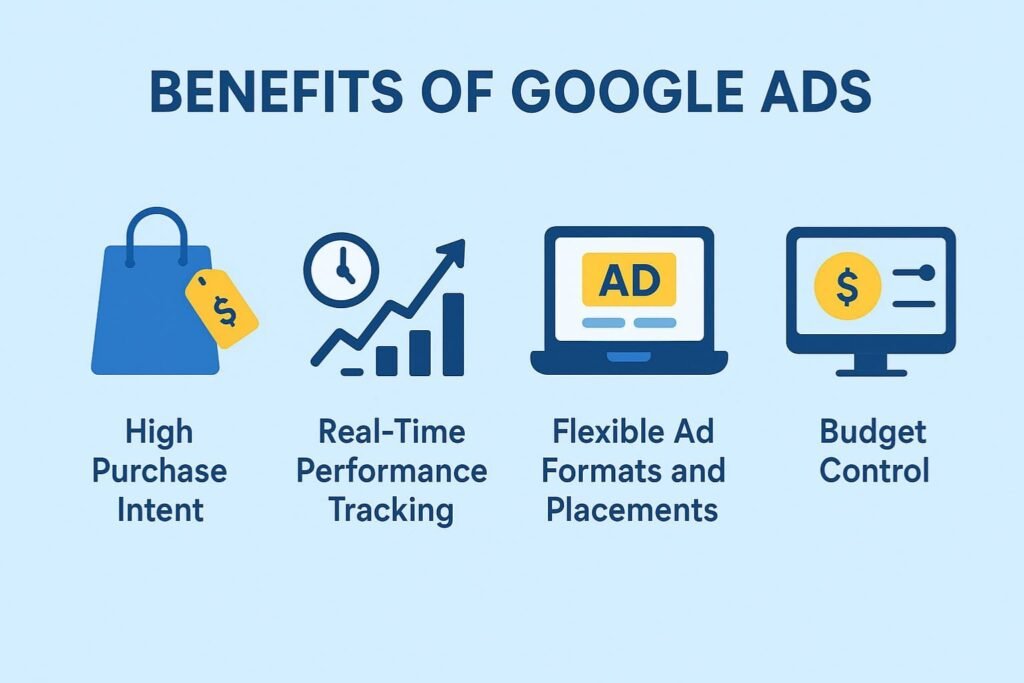
    Benefits of Google Ads

    If you want to reach people at the exact moment they’re searching for something you offer, Google Ads offers several key benefits.

    This image tells about the benefits of google ads

    a. High Purchase Intent

    Google Ads users are usually farther down the funnel. They’re searching with specific needs — “best home security system,” “SEO agency near me,” or “buy running shoes online.”

    This means:
    – Better lead quality
    – Shorter sales cycles
    – Higher conversion rates

    b. Real-Time Performance Tracking

    With Google’s powerful dashboard, you can monitor everything from CPC, impressions, click-through rates, and most importantly conversions.

    Integration with tools like:

    Google Analytics
    Google Tag Manager
    Google Ads conversion tracking

    Enables you to examine your campaign data in great detail, make wise choices, and keep getting better.

    c. Flexible Ad Formats and Placements

    You can use text ads for search intent, video ads for awareness via YouTube, and banner ads across Google’s Display Network, which spans over 2 million websites. This allows you to target people across all parts of the buyer journey not just at the end.

    d. Budget Control

    Whether you’re spending $5 or $5,000 a day, Google gives you full control. You can pause or adjust ads in real-time, set daily limits, and optimize your CPC to stay within budget while maximizing ROI.

    Benefits of Facebook Ads

    If your goal is brand awareness, building communities, or driving engagement through visuals, Facebook Ads offers a range of advantages that Google simply can’t match.

    This image tells about the benefits of facebook ads

    a. Visual-First Storytelling

    Facebook and Instagram are highly visual platforms. Whether it’s a product demo, testimonial video, or lifestyle image, you can showcase your brand in ways that emotionally connect with users. This leads to more engagement — likes, shares, comments — even if users aren’t ready to buy yet.

    Popular ad formats include:
    – Stories & Reels
    – Carousels
    – Instant Experiences
    – Collection Ads

    b. Advanced Audience Targeting

    Facebook Ads let you build highly detailed audiences based on:

    -Age, gender, location
    – Interests, hobbies, job titles
    – Website visits (via Facebook Pixel)
    – Custom and Lookalike audiences

    This data-rich targeting is ideal for businesses with specific customer profiles. For example, a vegan snack company can target users who follow plant-based groups, shop at organic stores, and attend food expos.

    Learn more here: Meta Targeting Options

    c. Lower Cost-Per-Click (CPC)

    The average CPC on Facebook is often much lower than Google, giving small businesses more room to test, experiment, and scale. This makes it a great platform for:

    – A/B testing creatives
    – Launching new products
    – Getting early customer feedback

    d. Intuitive Dashboard and Insights

    Meta’s Ads Manager dashboard offers real-time performance tracking. You can analyze reach, impressions, engagement, and conversions even tie them back to revenue if you’re using Facebook Pixel or Meta Conversions API.

    Explore the Ads Manager: Meta Ads Manager Guide

    How to Track Your PPC Results?

    One of the biggest mistakes businesses make is launching paid ads without properly measuring their performance.

    Understanding how to track your PPC results is critical if you want to optimize your spend, improve your ROI, and make data-backed decisions about whether Google Ads or Facebook Ads work better for your business.

    a. Google Ads Tracking: Comprehensive and Insight-Driven

    Google Ads offers one of the most robust dashboard systems available. From the moment someone sees your ad to the point they take an action (like filling a form or making a purchase), everything can be tracked in detail.

    Here’s how to start tracking effectively:

    – Set up conversion tracking via
    Google Ads Conversion Tracking: This tool helps measure what happens after a user clicks your ad — did they purchase, sign up, or call?

    – Link Google Analytics to your ad account via Google Analytics: This allows deeper behavioral analysis such as bounce rate, time spent on page, and pages viewed.

    – Use UTM parameters (UTM Builder tool): These are tracking tags added to your URL that let you identify the exact ad or keyword that led to a visit.

    – Track CPC (Cost-per-click), CTR (Click-through Rate), conversion rates, and Quality Score inside your dashboard to see what’s working and what needs adjusting.

    Google Ads’ strength lies in its data depth. You can see the entire journey from click to sale and compare performance by keyword, device, location, time of day, and more. This level of insight is essential if your business needs to make frequent and fast campaign adjustments.

    b. Facebook Ads Tracking: Great for Engagement and Retargeting

    While Facebook doesn’t offer the same search-based intent tracking as Google, its ad tools are highly effective for understanding user behavior across social and web platforms.

    Here’s what you’ll need:

    – Install the Meta Pixel: This is a tracking code that helps you measure the effectiveness of your advertising by understanding the actions people take on your website. You can set it up here.

    – Use Event Tracking: Meta allows you to track various actions (like purchases or leads) by setting up standard or custom events.

    – Monitor performance in Meta Ads Manager, Facebook’s native dashboard, where you can view metrics such as reach, clicks, engagements, CPC, and conversion rates.

    Facebook also allows offline conversion tracking and integration with CRMs using their Conversions API, which provides even more data on user journeys that begin offline or cross channels.

    When to Use Google Ads vs Facebook Ads?

    Choosing between Google Ads vs Facebook Ads is not about picking the “better” platform. It’s about understanding which one fits your business goals, customer behavior, and budget strategy.

    a. Use Google Ads When:

    Your customers are already searching for a product or service like yours.
    – You offer emergency or need-based services, such as plumbing, car repair, or legal help.
    – You want to target users closer to making a purchase (high intent).
    – You want predictable, conversion-driven ROI through keyword targeting.
    – You want access to granular metrics, like CPC, ad position, and conversion rates via a comprehensive dashboard.

    For example, if you’re a local HVAC service provider, users searching “AC repair near me” are hot leads. Google Ads ensures your business appears when they’re actively looking.

    More info: Google Ads Campaign Types

    b. Use Facebook Ads When:

    You’re introducing a new product or concept that people aren’t searching for yet.
    – You want to build brand awareness, customer communities, or social engagement.
    – Your product is visually appealing (fashion, food, wellness, etc.).
    – You want to leverage audience insights based on demographics and interests.
    – You need a platform for retargeting website visitors or cart abandoners.

    An example? A startup that sells eco-friendly home goods may not get much search traffic initially. But on Facebook, they can visually show off their product benefits to a lookalike audience — and follow up with retargeting later.

    More info: Meta Ads Guide

    Combining Both for the Best ROI

    The smartest marketers don’t view this as Google Ads vs Facebook Ads — they use both in tandem to create a multi-touch advertising strategy that supports the entire customer journey.

    a. The Funnel Approach

    Think about your funnel in three stages:

    – Top of Funnel (Awareness): Use Facebook Ads to introduce your product or service with eye-catching videos, lifestyle content, and story-based ads.

    – Middle of Funnel (Consideration): Retarget Facebook traffic with lead magnet ads (like ebooks or free trials), and start running Google Ads for mid-intent keywords like “top CRM software” or “best yoga mats.”

    – Bottom of Funnel (Decision): Use Google Search Ads for high-intent, purchase-ready terms. Add Google Display Ads to retarget users who visited your pricing page or abandoned a cart.

    This full-funnel approach ensures your message appears at every step of the user journey — which can significantly boost conversion rates and reduce wasted ad spend.

    b. Retargeting Across Platforms

    Let’s say someone clicks a Google Ad, visits your website, but doesn’t convert. You can now use Facebook Ads to show that person a reminder about the product they viewed possibly with a discount or testimonial ad.

    And vice versa: users who engage with a Facebook video but don’t take action can be retargeted with a more direct, intent-driven Google Search Ad.

    c. Budget Allocation Based on Performance

    Once both campaigns are running, use performance data from:

    – Google Ads dashboard
    – Meta Ads Manager

    Compare:

    – CPC
    – Conversion rates
    – Customer acquisition costs (CAC)
    – Return on ad spend (ROAS)

    Shift budget toward the platform that drives more value — or split it intelligently based on funnel position. For many businesses, the combination of Google Ads for conversions and Facebook Ads for engagement results in the highest overall ROI.

    Conclusion: Where Should You Invest for Better ROI ?

    When comparing Google Ads vs Facebook Ads, there is no one-size-fits-all answer. Each platform offers distinct strengths, and the best choice often depends on your business goals, budget, industry, and where your customers are in the buying journey.

    If your primary objective is to capture high-intent leads who are actively searching for what you offer, the Benefits of Google Ads include greater visibility on search engines, higher conversion rates, and access to real-time performance data via a robust dashboard.

    With detailed tracking through tools like Google Analytics, Google Ads is an excellent solution for performance-focused marketers.

    On the other hand, the Benefits of Facebook Ads lie in their unmatched audience targeting, creative freedom, and lower CPC.

    If you’re looking to build brand awareness, engage with users through visuals, or retarget website visitors effectively, Facebook Ads might deliver stronger long-term value.

    Understanding how to track your PPC results across both platforms is key to making informed decisions. Using tools like Meta Pixel, Google Ads Conversion Tracking, and UTM parameters ensures that you’re not just spending — you’re learning and optimizing for better ROI.

    The best approach? Use both platforms together. Start with Facebook Ads to drive awareness, then use Google Ads to capture searches and close conversions.

    Combining both strategies allows you to meet users at multiple touchpoints, from discovery to decision.

    Digital advertising ultimately comes down to matching the appropriate approach with your company’s objectives, not picking one platform over another.

    Adsagenz allows you to optimize outcomes by utilizing the power of Facebook Ads, Google Ads, or both. With Adsagenz, begin experimenting, learning, and expanding your company right now!